Kuselan!!!The much-awaited tamil flick that hits the theaters with a bang on August 1,2008 featuring the asia’s most favourite super star RAJINIKANTH. Is this name not enough????This name itself stirs cheers and applause from not only serious rajini buffs but also from every strata of the society ranging from kids to oldies,rich to poor.Such is the Rajini phenomenon.Even though the film has the super star appearing only in a guest role(approx.60 mins through out the film inclusive of 3 songs) the film has not failed to kindle enough expectations and eagerness that would be available with a full length RK movie.Ok enough about rajinikanth..Lets take a sneek look at this venture being produced by Kavithalaya.
DIRECTOR:
Captain of the ship…In this case its P.Vasu.He knows the strengths of the 'Super Star' very well than any other directors. He has worked with the actor on several occasions in the past and no doubt they were astonishing blockbusters. The duo had tasted success in ‘Panakaran’, ‘Mannan’, ‘Uzhaipalli’ and ‘Chandramukhi’ in the past.
PLOT:
This time Vasu has chosen to remake ‘Katha Parayumbol’, a Malayalam movie produced,directed and acted by Sreenivasan, which went on to become a smash hit in Mollywood. The plot is so simple such that the movie revolves around the tale of friendship shared between a popular actor and a poor barberThe movie is about two childhood friends. One grows up to become a successful actor and the other, barber, who struggles to eke out his livelihood. What happens when they meet forms the crux of the story.(As you all might know this name is taken from hindu mythology where kuselan is a friend of Lord Krishna who is very poor and shows his friendliness to Krishna by giving beaten rice even when he and his family are in absolute poverty.Thus one would be reminded of the word friendship when they come across the word kuselan.Thats why the producers and director have chosen this name quite aptly.)
CAST AND FILM CREW:
‘Kuselan’ features Pasupathy and Rajinikanth in lead roles. Pasupathy plays a poor barber. Meena dons the role of his wife, while Nayantara plays herself in the movie.The musical score is done by G V Prakash. Although the songs are not getting craved from people other than Rajini fans but one would expect that it could get much and much better once the film releases. Aravindh Krishna has handled the camera. The movie has a huge star cast which includes Vadivelu, Prabhu, Vijayakumar, Sneha among others.
USP:
1.What else can it be???Its Rajinikanth,rajinikanth and only rajinikanth.The costume designer and the director has taken some painstaking steps to ensure Rajini looks much and much younger and smarter than any of his previous films.His make up and costumes look fitting and appealing.
2.The climax, with Pasupathy and Rajini, is said to melt hearts!Rajini is said to have cried in the climax of the movie which would be a different kind of treat for his fans..
3.Vadivelu is said to have done the role of his career and is said to be toooooo hilarious.
In all kuselan is said to be a fun filling family entertainer ride!!!!!!!!
So what else are u waiting for???Book your tickets for kuselan soon and rock!!
And our best wishes for Kuselan from our team!!!!

Happy FreindShip Day - Advanced Wishes

There is not much literature on Friendship Day history as we celebrate this day . However, there are numerous folktales and several instance in mythological legends that shows that friends and friendship have been valued since the beginning of civilized world. As an intrinsically social creature, men love to make friends to further this process of socialization.
History of Friendship Day in US
Considering the valuable role friends play in our life it was deemed to fit to have a day dedicated to friends and friendship. The United States Congress, in 1935, proclaimed first Sunday of August as the National Friendship Day. Since then, celebration of National Friendship Day became an annual event. The noble idea of honoring the beautiful relationship of friendship caught on with the people and soon Friendship Day became a hugely popular festival. Following the popularity and success of Friendship Day in US, several other countries adopted the tradition of dedicating a day to friends. Today, Friendship Day is enthusiastically celebrated by several countries across the world including India.
History of Friendship Day in US
Considering the valuable role friends play in our life it was deemed to fit to have a day dedicated to friends and friendship. The United States Congress, in 1935, proclaimed first Sunday of August as the National Friendship Day. Since then, celebration of National Friendship Day became an annual event. The noble idea of honoring the beautiful relationship of friendship caught on with the people and soon Friendship Day became a hugely popular festival. Following the popularity and success of Friendship Day in US, several other countries adopted the tradition of dedicating a day to friends. Today, Friendship Day is enthusiastically celebrated by several countries across the world including India.
In 1997, the United Nations named Winnie - the Pooh as the world's Ambassador of Friendship.
Importance of Friendship in Bible
The Bible, the primary text of the western civilization, reflects upon friendship as the bond that forms the foundation to human faith, trust and companionship. Following verses from the bible aptly portray the importance of friends.
"Ask and it will be given to you; seek and you will find; knock and the door will be opened to you.” Matthew 7:7
“Greater love hath no man than this that a man lay down his life for his friends.” : John 15:13-15
Besides, there are several tales from the Old Testament and the New Testament about the value of friendship and how true friendship is a treasure to unearth. A noticeable point is that, both the versions make a difference between the two broad meanings of friendship- one is a mere acquaintance, the other is a more affectionate relation.In the Old Testament, Abraham is called the “friend of God” because of the intimacy of his relations. God speaks to Moses face to face “as a man…unto his friend” (Ex 33:11). The romantic friendship of Ruth and Naomi, the devotion of the subordinate Hushai for David, or the mutual relation between David and Jonathan - the Old Testament is replete with these interesting tales of friends and friendship.In the New Testament, the relationship between Jesus and his disciples clearly depicts how human friendship can constantly grow. From being teacher and disciple, to lord and servant their relationship finally grew to an unparalleled friendship.
Importance of Friendship in Mahabharata
In the famous Hindu epic ‘Mahabharata’, Lord Krishna demonstrates the many colors of friendship - affection, romance, brotherhood, protection, guidance, intimacy and even teasing. Friendship is all about these and much more.
WE WISH ALL OUR VISITORS ADVANCED HAPPY FREINDSHIP DAY
WE WISH ALL OUR VISITORS ADVANCED HAPPY FREINDSHIP DAY
Sony Ericsson's new W595 Walkman Phone


The last of the new mobile phones launched by Sony Ericsson a couple of days ago is the new W595 walkman phone. Like the other two new Sony Ericsson phones, the W902 and W302, the W595 also promises to give users full pleasure when listening music as well as impressive mobile phone features and functionality.
The W595 like the W902 boasts of a 2.2-inch LCD screen which suits well with video watching. It comes packed with a 2GB memory stick micro for storage. The W595 also features built-in speakers for sharing music with friends. An additional slot for stereo share jack is included as well. Like the other two new phones, the W505 also features SensME, Shake control and trackID. For entertainment purposes, the W595 also comes preloaded with games.Other features of the Sony Ericsson W595 walkman phone include; Bluetooth, a 3.2 megapixel camera for snapping great moments and sharing it with friends, a 40 GB internal phone memory, camera features that allows video recording, picture blogging, and a 2.5x digital zoom. In addition, the W505 also features an FM Radio, allows video viewing and streaming, limited video calling feature, polyphonic ring tones, megabass feature, USB 2.0 support, web browsing through Access NetFront and your usual mobile organizer functionality.The Sony Ericsson W595 Walkman phone will be available in three variants namely the W595 which is a UMTS/HSDPA 2100 and GSM/GPRS/EDGE 850/900/1800/1900 phone and will be release in Active Blue, Cosmopolitan White, Jungle Grey and Lava Black, W595c is a GSM/GPRS/EDGE 850/900/1800/1900 phone that will be available in selected markets in Active Blue, Cosmopolitan White and Jungle Grey, and the W595a which is a GSM/GPRS/EDGE 850/900/1800/1900 phone that will be available in selected markets in Active Blue, Cosmopolitan White, Jungle Grey and Lava Black. All three W595 models will be available in Q4.
Nokia 6124

Nokia has added a new model to its collection of classic mobile phones with its all new Nokia 6124. Released exclusively for Vodafone users, the Nokia 6124 gives users faster and easier access to all of Vodafone’s high speed Internet and entertainment services.
Nokia 6124 uses the Symbian OS and using this software the Nokia 6124 lets users download third-party applications and mobile contents from the web. The Nokia 6124 also allows users to do multitasking, that is, listen to music while browsing the web or answering a phone call.
The Nokia 6124 is packed with powerful mobile features including superior data rates with 3G broadband that allows downloads of up to 10 times faster than 3G networks. Hence, Internet browsing when using the 6124 as a modem to connect laptops and notebooks becomes more exciting. Reading SMS, watching videos or viewing pictures is a breeze with the Nokia 6124’s large 2.0” display that displays outstanding brightness and clarity. Not to be outdone by most camera phones today, the Nokia 6124 is equipped with a 2.0 megapixel camera with a built-in flash and panorama mode. Data storage is not a problem as well with the Nokia 6124’s memory card slot which allows 8GB memory expansion
The Nokia 6124 will be available at all Vodafone distributing outlets by the second quarter of 2008.
Nokia 6124 uses the Symbian OS and using this software the Nokia 6124 lets users download third-party applications and mobile contents from the web. The Nokia 6124 also allows users to do multitasking, that is, listen to music while browsing the web or answering a phone call.
The Nokia 6124 is packed with powerful mobile features including superior data rates with 3G broadband that allows downloads of up to 10 times faster than 3G networks. Hence, Internet browsing when using the 6124 as a modem to connect laptops and notebooks becomes more exciting. Reading SMS, watching videos or viewing pictures is a breeze with the Nokia 6124’s large 2.0” display that displays outstanding brightness and clarity. Not to be outdone by most camera phones today, the Nokia 6124 is equipped with a 2.0 megapixel camera with a built-in flash and panorama mode. Data storage is not a problem as well with the Nokia 6124’s memory card slot which allows 8GB memory expansion
The Nokia 6124 will be available at all Vodafone distributing outlets by the second quarter of 2008.
Tata Indicom's Photon - the high speed Internet Access Service


Tata Indicom introduces its new Photon, a new High Speed Internet Access (HSIA) service. Photon - the next generation technology offers a great wireless internet connectivity solution. Using this technology you can access to the internet at never before speeds
The new USB Modem enables you to use internet from any where around the world . So now go ahead and subscribe to this innovative new service from Tata Indicom along with the new USB Modem & enjoy a truly world class, first of its kind internet experience.
Unbelievable Speed :
The new USB Modem enables you to use internet from any where around the world . So now go ahead and subscribe to this innovative new service from Tata Indicom along with the new USB Modem & enjoy a truly world class, first of its kind internet experience.
Unbelievable Speed :
The Tata Indicom’s Photon – HSIA Service would enable you to have an access to internet at super fast speeds using the new USB modem.
Internet on the go:
Internet on the go:
With the new USB Modem you also now have the convenience of being able to access Tata Indicom’s Photon service(HSIA) from wherever you are.
Its an USB modem :
Its an USB modem :
All you now need to do is just plug the USB Modem into your Laptop/Desktop PC and you are ready to access a whole new world of High speed internet connectivity.
Multi-functional Device: The new USB Modem device forming part of its Photon service also allows you to make voice calls, Send & Receive SMS. It also supports your Laptop/Desktop PC earphone and microphone.
Tata Indicom's Photon - High Speed Internet Access ( HSIA ) service can be accessed only in those areas where Tata Indicom has Photon service coverage.
Features and Specifications
Speed : 2.4 Mbps (Downlink speed) Actual internet speed will depend on multiple actors like time of the day, number of simultaneous users, web page accessed etc.
RUIM :RUIM Enabled (currently programmed hand sets are provided to customers NON RUIM).
Multi-functional Device: The new USB Modem device forming part of its Photon service also allows you to make voice calls, Send & Receive SMS. It also supports your Laptop/Desktop PC earphone and microphone.
Tata Indicom's Photon - High Speed Internet Access ( HSIA ) service can be accessed only in those areas where Tata Indicom has Photon service coverage.
Features and Specifications
Speed : 2.4 Mbps (Downlink speed) Actual internet speed will depend on multiple actors like time of the day, number of simultaneous users, web page accessed etc.
RUIM :RUIM Enabled (currently programmed hand sets are provided to customers NON RUIM).
OS :Win 2000, Win XP, Win Vista
Antenna :External
Antenna :External
Minimum system requirement:
CPU : Pentium-II / 233 MHz
USB Interface : 2.0 (1.0 and 1.1 compatible)
Optical drive : CD-ROM(For installation only)
Memory : 64 MB
Disk space : 50 MB (Used for installation of applications)
TATA NANO - The People's Car
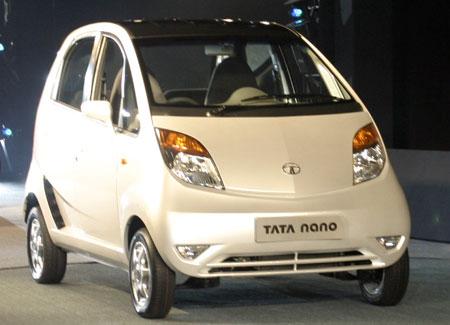

How Tata Nano Saves cost?
- No Radio, Power windows, air conditioning, anti lock brakes, air bags, remote locks or power steering.
- Rear wheel drive: manually actuated 4-speed trans axle that gives the car better fuel efficiency
- Wheel Bearing: Wheel bearing is strong enough to drive the car at 72kmph but would quickly wear out at higher speeds.
- Analogue speedometer, odometer and fuel gauge.
- Single windscreen wiper
Speed of Tata Nano:
- Top speed - 105kmph
- Length: 3.1m
- Height: 1.6 m
- Width: 1.5 m
Engine specifications for Tata Nano:
Safety features for Tata Nano - The 1 Lakh car:
- Sheet metal body
- Crumple zones
- Intrusion resistant doors
- Seat belts
- Strong seats and anchorages
- Rear tailgate glass bonded to the body.
- Tubeless Tyres
How green is Tata Nano?
- Tailpipe emission exceeds current regulatory requirements
- Lower overall pollution level than two-wheelers
- Fuel efficient (20 km/litre), ensures low carbon dioxide emissions.
- Front Bonnet
- Holds Battery
- Wind-Shield washer bottle
- Room for single suitcase
- Spare wheel
INTERESTING FACTS :
->21% more space than Maruti 800!
-> Standard model would cost roughly Rs. 1,25,000 onroad
-> Will be launched countrywide in September 2008.
The new Lenovo IdeaPad U110

Lenovo has come out with a Gorgeous and an ultra light weight laptop that you would have seen in recent times. Its called the Lenovo IdeaPad U110. The beautiful design, solid construction, sharp screen resolution and keyboard will surely catch your attention. Added to that its price tag is also very attractive and is best suited for people on move or those who travel very frequently. Now let us get deep into its design, features, performance, battery life etc.
Design : The IdeaPad U110 is very compact in size but the keyboard and screen are so designed to give a you a smooth experience for long durations. Most of the external features like keyboard, touch pad, quick launch keys, mouse buttons are given a glossy piano finish. Just above the keyboard you can see a set of glowing orange launch buttons which has an aesthetic touch. It has power and Novo buttons on the left side which provides you with quick system recovery and to manage battery life respectively.
Features: Lenovo IdeaPad U110 comes with the latest 1.6GHz Intel core 2 Duo L7500 processor and Intel 965GM chipset which is more than sufficient for all sorts of applications that you might run on this system. For faster speeds it has 2GB RAM of 667 MHz frequency. You cannot ask for something better than this. It has 120 GB Hard disk which runs at 4,200 RPM. For better video quality it provides you Intel GMA X3100 integrated graphics card. And as said above it is ultraportable in nature. For those who are avid music lovers there is Stereo speakers with Dolby Virtual surround and has head phone and micro phone jacks. It comes with Windows Vista Home Premium.
Performance: It promises to give you a good experience on a whole. The 2GB RAM along with the latest processors gives you the desired speed for running multiple applications simultaneously. Its weight is another advantage as it can be easily be carried anywhere without much hassle. Though one problem it has is the lack of in built optical drive. So you need to carry an external one if you are very much in need of one. The combination of features, prices and performance is very much competitive with the products available in the markets today.
Battery Life: Lenovo IdeaPad U110 ships with 2 batteries, one which is a 4 cell battery which will last for around 1 hour 30 minutes nearly and the other is a 7 cell battery which will provide you a back for 3 hours nonstop. SO you have clearly two options in hand.
FEATURES TABULATED
Price : $1,799(starting price)
Processor : 1.6GHz Intel Core 2 Duo L7500
Memory : 2GB of 667MHz
Hard drive : 120GB at 4,200rpm
Chipset : Intel 965GM Express
Cache size : 4 MB (type L2)
2.9 / 3.6 pounds with 7-cell battery : Intel GMA X3100 (integrated)
Operating System : Windows Vista Home Premium
Dimensions (WDH) : 10.8x7.7x0.72 inches
Screen size (diagonal) : 11.1 inches
System weight / Weight with AC adapter : 2.4 / 3.1 pounds with 4-cell battery
Category : ultra portable
Design : The IdeaPad U110 is very compact in size but the keyboard and screen are so designed to give a you a smooth experience for long durations. Most of the external features like keyboard, touch pad, quick launch keys, mouse buttons are given a glossy piano finish. Just above the keyboard you can see a set of glowing orange launch buttons which has an aesthetic touch. It has power and Novo buttons on the left side which provides you with quick system recovery and to manage battery life respectively.
Features: Lenovo IdeaPad U110 comes with the latest 1.6GHz Intel core 2 Duo L7500 processor and Intel 965GM chipset which is more than sufficient for all sorts of applications that you might run on this system. For faster speeds it has 2GB RAM of 667 MHz frequency. You cannot ask for something better than this. It has 120 GB Hard disk which runs at 4,200 RPM. For better video quality it provides you Intel GMA X3100 integrated graphics card. And as said above it is ultraportable in nature. For those who are avid music lovers there is Stereo speakers with Dolby Virtual surround and has head phone and micro phone jacks. It comes with Windows Vista Home Premium.
Performance: It promises to give you a good experience on a whole. The 2GB RAM along with the latest processors gives you the desired speed for running multiple applications simultaneously. Its weight is another advantage as it can be easily be carried anywhere without much hassle. Though one problem it has is the lack of in built optical drive. So you need to carry an external one if you are very much in need of one. The combination of features, prices and performance is very much competitive with the products available in the markets today.
Battery Life: Lenovo IdeaPad U110 ships with 2 batteries, one which is a 4 cell battery which will last for around 1 hour 30 minutes nearly and the other is a 7 cell battery which will provide you a back for 3 hours nonstop. SO you have clearly two options in hand.
FEATURES TABULATED
Price : $1,799(starting price)
Processor : 1.6GHz Intel Core 2 Duo L7500
Memory : 2GB of 667MHz
Hard drive : 120GB at 4,200rpm
Chipset : Intel 965GM Express
Cache size : 4 MB (type L2)
2.9 / 3.6 pounds with 7-cell battery : Intel GMA X3100 (integrated)
Operating System : Windows Vista Home Premium
Dimensions (WDH) : 10.8x7.7x0.72 inches
Screen size (diagonal) : 11.1 inches
System weight / Weight with AC adapter : 2.4 / 3.1 pounds with 4-cell battery
Category : ultra portable
Things the 3G iPhone is Still Missing

1. Multimedia messaging - Almost every other cell phone in the market has the ability to send images to other cell phones via multimedia messaging, or MMS. Yes you can still e-mail those photos, but MMS is such a basic feature that it should've been in the iPhone from the start.
2. Copy and paste - Again, this is such a basic feature. Having copy and paste makes it easier to type out text messages and e-mails.
3. Video recording - In the world of mobile video, Qik, and YouTube, it's a shame the iPhone doesn't have video-recording capabilities. Yes the quality wouldn't be that great, but it should be an option anyway.
4. Voice command - For a touch-screen phone, we think voice command and voice dialing would've been a great feature add-on for the iPhone. Perhaps this will be added via a third-party app, but we would really prefer this to be a native setting.
5. Bluetooth flexibility - Right now, all you can use Bluetooth on the iPhone for are headset voice calls, and that's it. This is sufficient for most people, sure, but we would like for Apple and AT&T to open up the Bluetooth profiles for the iPhone. This means we would like stereo Bluetooth and A2DP for streaming music wirelessly, Bluetooth tethering so we can use the iPhone as a modem, and finally we would like to have Bluetooth file-transfer protocol so we can transfer files to and from the iPhone.
6. Horizontal keyboard for e-mail and notes -Another annoyance for writers--and a confusing omission, given the capability of the iPhone's on-screen keyboard to flip horizontally for some applications but not for others--is the fact that the touch-screen keyboard doesn't rotate to a landscape orientation when using the Notes, e-mail, or Maps applications. Those also happen to be the three most writing-intensive apps on the iPhone, which makes the necessary one-finger hunting and pecking required by the portrait-mode keyboard all the more annoying if you use those features a lot.Over time, using your thumbs to type versus holding the phone in one hand and poking at the keys with one finger is a lot more significant than you might think.
7. Improved predictive text (or the ability to turn it off) - The iPhone's predictive text feature (where the phone "guesses" what you're going to write after you enter a few characters--to eliminate typos) does a decent job of streamlining typing. However, it has only an "opt-out" feature, which requires hitting a very small "x" to deselect the word it suggests. This is where that feature fails. The time it saves in correcting miscues sometimes pales in comparison to the frustration it causes in forcing you to repeatedly deselect words. And there's no way to turn it off or create a keyboard-based shortcut to deselect the predicted word.
8. Flash support - Sadly, no one really knows when being able to view Flash animations or films will be a reality on the iPhone. This big wish-list item for the second-gen version is still missing from the 3G handset. Even though YouTube clips are in Flash format on the Web, they've been converted to QuickTime format specifically for the iPhone-centric version of YouTube. The lack of Flash support means Safari fumbles when it comes to YouTube clips embedded in blog posts or other pages; those just show up as broken plugin icons, with no option to launch the clips in the iPhone's separate YouTube application.
2. Copy and paste - Again, this is such a basic feature. Having copy and paste makes it easier to type out text messages and e-mails.
3. Video recording - In the world of mobile video, Qik, and YouTube, it's a shame the iPhone doesn't have video-recording capabilities. Yes the quality wouldn't be that great, but it should be an option anyway.
4. Voice command - For a touch-screen phone, we think voice command and voice dialing would've been a great feature add-on for the iPhone. Perhaps this will be added via a third-party app, but we would really prefer this to be a native setting.
5. Bluetooth flexibility - Right now, all you can use Bluetooth on the iPhone for are headset voice calls, and that's it. This is sufficient for most people, sure, but we would like for Apple and AT&T to open up the Bluetooth profiles for the iPhone. This means we would like stereo Bluetooth and A2DP for streaming music wirelessly, Bluetooth tethering so we can use the iPhone as a modem, and finally we would like to have Bluetooth file-transfer protocol so we can transfer files to and from the iPhone.
6. Horizontal keyboard for e-mail and notes -Another annoyance for writers--and a confusing omission, given the capability of the iPhone's on-screen keyboard to flip horizontally for some applications but not for others--is the fact that the touch-screen keyboard doesn't rotate to a landscape orientation when using the Notes, e-mail, or Maps applications. Those also happen to be the three most writing-intensive apps on the iPhone, which makes the necessary one-finger hunting and pecking required by the portrait-mode keyboard all the more annoying if you use those features a lot.Over time, using your thumbs to type versus holding the phone in one hand and poking at the keys with one finger is a lot more significant than you might think.
7. Improved predictive text (or the ability to turn it off) - The iPhone's predictive text feature (where the phone "guesses" what you're going to write after you enter a few characters--to eliminate typos) does a decent job of streamlining typing. However, it has only an "opt-out" feature, which requires hitting a very small "x" to deselect the word it suggests. This is where that feature fails. The time it saves in correcting miscues sometimes pales in comparison to the frustration it causes in forcing you to repeatedly deselect words. And there's no way to turn it off or create a keyboard-based shortcut to deselect the predicted word.
8. Flash support - Sadly, no one really knows when being able to view Flash animations or films will be a reality on the iPhone. This big wish-list item for the second-gen version is still missing from the 3G handset. Even though YouTube clips are in Flash format on the Web, they've been converted to QuickTime format specifically for the iPhone-centric version of YouTube. The lack of Flash support means Safari fumbles when it comes to YouTube clips embedded in blog posts or other pages; those just show up as broken plugin icons, with no option to launch the clips in the iPhone's separate YouTube application.
India in Sri Lanka
hi guys , 
 With the
  Full
Full  pledged India - Sri Lanka series is about to start with in a weeks time ,the danger men to Indian batting lineup would be
  the spin duo of Muttiah Muralitharan and Ajantha Mendis . Muralitharan has
  played well against India in the two popular formats of the game . Mendis has played against India in only one match, but he impressed the whole of cricketing world with the dream spell of 8-1-13-6 that shattered India's dream of winning its Fifth Asia cup. But India's test captain Anil Kumble has said that the experienced trio of Rahul - Sachin - Sourav has the ability to face any sort of spin threats possed towards India. The other person who can threat India's top order would be the left arm seamer Chaminda Vaas,the man who has demolishied the worlds best batting line up with his clever and perfect angle balls . The first test starts on July 23 at the Sinhalese Sports Club in Colombo. So it would be intresting to see how the popular batting trio from India counter the attack from the bowling department of Sri Lankan team lead by Chaminda Vaas. So wait and see the clash of titans from the subcontinentals teams.

 With the
  Full
Full  pledged India - Sri Lanka series is about to start with in a weeks time ,the danger men to Indian batting lineup would be
  the spin duo of Muttiah Muralitharan and Ajantha Mendis . Muralitharan has
  played well against India in the two popular formats of the game . Mendis has played against India in only one match, but he impressed the whole of cricketing world with the dream spell of 8-1-13-6 that shattered India's dream of winning its Fifth Asia cup. But India's test captain Anil Kumble has said that the experienced trio of Rahul - Sachin - Sourav has the ability to face any sort of spin threats possed towards India. The other person who can threat India's top order would be the left arm seamer Chaminda Vaas,the man who has demolishied the worlds best batting line up with his clever and perfect angle balls . The first test starts on July 23 at the Sinhalese Sports Club in Colombo. So it would be intresting to see how the popular batting trio from India counter the attack from the bowling department of Sri Lankan team lead by Chaminda Vaas. So wait and see the clash of titans from the subcontinentals teams.
 Liquid-crystal displays
Liquid-crystal displays (LCD), in the past restricted to notebooks, are now a reality for desktops. The three greatest advantages of this type of video monitor compared to traditional tube-based monitors (a.k.a. CRT, Cathode Ray Tube) are the use of less space on the desk (especially 17" models or bigger), less power consumption and 100% flicker-free, even with a refresh rate of only 60 frames per second (60 Hz). In this tutorial we will explain everything you need to know to make the right choice when buying a new LCD monitor.
The most important thing you need to know about LCD technology is that LCD panels have a fixed resolution. This resolution is called “native resolution”, “maximum resolution” or simply “resolution” and you must configure your desktop to that resolution, otherwise three things can happen, depending on the model of your monitor:
1. The image won’t be “sharp”; it will be blurred. You will see lots of squared areas, without any definition.
2. The monitor will centralize the image in the new resolution, reducing the image size and inserting a black frame around the image. For instance, if your LCD native resolution is 1280x960 and you decreased it to 800x600, this means there are 480 pixels left horizontally (1280 - 800) and 360 pixels left vertically (960 - 600). The image will be centralized and there will be 240 black pixels above and below the image and 180 blank pixels on the sides of the image.
3. The monitor will try to stretch the image in order to not show the black area around of the image, filling the whole screen. This is done thru a technique called interpolation, which isn’t 100% perfect and thus you will feel that the image has better quality (definition) when the screen is configured at its native resolution, even though the elements on the screen (e.g. icons, letters, etc) will be smaller. In general you will feel that the image is slightly out of focus (blurred) when the monitor is not configured in its native resolution.
The most important thing you need to know about LCD technology is that LCD panels have a fixed resolution. This resolution is called “native resolution”, “maximum resolution” or simply “resolution” and you must configure your desktop to that resolution, otherwise three things can happen, depending on the model of your monitor:
1. The image won’t be “sharp”; it will be blurred. You will see lots of squared areas, without any definition.
2. The monitor will centralize the image in the new resolution, reducing the image size and inserting a black frame around the image. For instance, if your LCD native resolution is 1280x960 and you decreased it to 800x600, this means there are 480 pixels left horizontally (1280 - 800) and 360 pixels left vertically (960 - 600). The image will be centralized and there will be 240 black pixels above and below the image and 180 blank pixels on the sides of the image.
3. The monitor will try to stretch the image in order to not show the black area around of the image, filling the whole screen. This is done thru a technique called interpolation, which isn’t 100% perfect and thus you will feel that the image has better quality (definition) when the screen is configured at its native resolution, even though the elements on the screen (e.g. icons, letters, etc) will be smaller. In general you will feel that the image is slightly out of focus (blurred) when the monitor is not configured in its native resolution.
Subscribe to:
Posts (Atom)